
If your firm pays for a click, the ad has one job: help the right person understand whether to contact you. A call about the wrong practice area still costs money and intake time. This guide shows you how to write Google Search ads for lawyers around the cases you can actually take.
Start with the client question and your service area. Then write distinct responsive search ad headlines and descriptions, send the click to a relevant page, and judge results by qualified inquiries and signed matters rather than clicks alone. Your marketing team can implement the campaign; you should approve the promises, intake path, and budget.
We’ll discuss the following:
- How to ensure your ads are bar-compliant
- How to nail your quality scores
- How to write high-converting landing pages
… and more.
Let’s dive right in.
Anatomy of a Google Ad
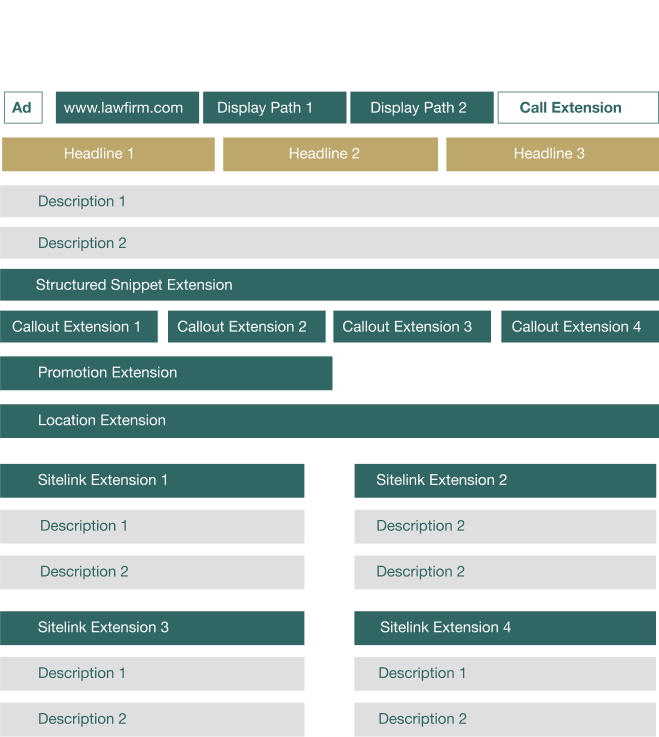
A Google Search ad can combine a final URL, display path, responsive headlines and descriptions, and eligible assets. The examples pictured below show an older interface; use the current fields in your Google Ads account when building a campaign.
- Final URL and display path
- Responsive search ad headline options
- Descriptions that set expectations
- Sitelink assets
- Callout assets
- Call assets
- Location assets
- Structured snippet assets
- Promotion assets
- Lead form assets
Choose assets that help a prospective client take the next step. A call asset can help when trained intake staff can answer; a location asset can help when the office serves that market. Google decides which eligible assets to show. Adding every asset does not guarantee better placement or more signed cases.
Let’s discuss these in detail.
The ads we’re covering in this guide are Google Search Ads, which operate on a pay-per-click (PPC) model. These are different from Google’s Local Services Ads (LSAs), which use a pay-per-lead model and appear above traditional search ads. LSAs also feature a “Google Screened” badge for lawyers who pass Google’s background and license verification. If you’re exploring LSAs, they require a separate setup process. This guide focuses entirely on writing and optimizing standard Google Search Ads.
Final URL & display path
The final URL is a link to the ad’s corresponding landing page.
However, the display path is what actually appears in your ad. So the final URL might be www.lawfirm.com, but the ad shows the display path, such as www.lawfirm.com/practice-area/location.
Your display path should include keywords. You have 15 characters to work with for each of the two subfolders, for example: lawfirm.com/_____/_____.

Write headline options for a responsive search ad
Each headline can use up to 30 characters. Write options around one practice and client need. For example, an injury firm might identify its city, say what type of matters it reviews, and offer a consultation if it actually does so. Avoid a promise about outcome or speed that the firm cannot keep.
For a responsive search ad, you can supply up to 15 headlines and four descriptions. Google assembles different combinations and may show only one headline and one description. Review combinations for misleading implications. Google explains responsive search ads and pinning.
Pin text only when it must appear in a particular position, such as a required disclosure. Pinning limits combinations and can affect Ad Strength. If a disclaimer must always show, use a position Google says is guaranteed to appear and have counsel review the entire ad, its assets, and landing page.

Use descriptions to set expectations
Each description can use up to 90 characters. Explain what happens after contact: a consultation request, a call with intake, or another real process. The claim should match the landing page. Write distinct options, then read them with each headline option that could appear. Do not promise a case review, fee arrangement, or result the firm cannot deliver.
Sitelink assets
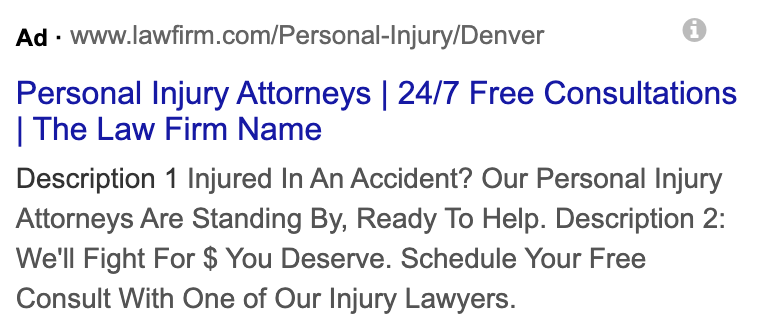
Sitelinks are deep links that take users to specific pages of your site. For example, you could include sitelinks that direct users to contact, case results, about, and practice areas pages. You could also link your sitelink extensions to certain practice areas.
There is a sitelink extensions heading (25 characters) and 2 descriptions (35 characters each).
Callout assets
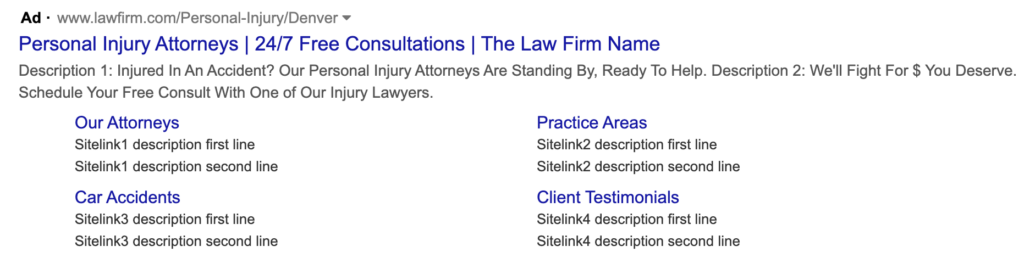
Sitelinks and callouts may look the same on the backend, but the key difference is that sitelinks contain a link while callouts are just text. As you might expect, sitelinks appear in blue, indicating a clickable link. Callouts look like regular gray ad text and are 25 characters long.
Callouts draw potential clients’ attention to what you have to offer, such as special promotions or value propositions. Since they allow you to add more text to your ads, callouts can increase your click-through-rate.

Location assets
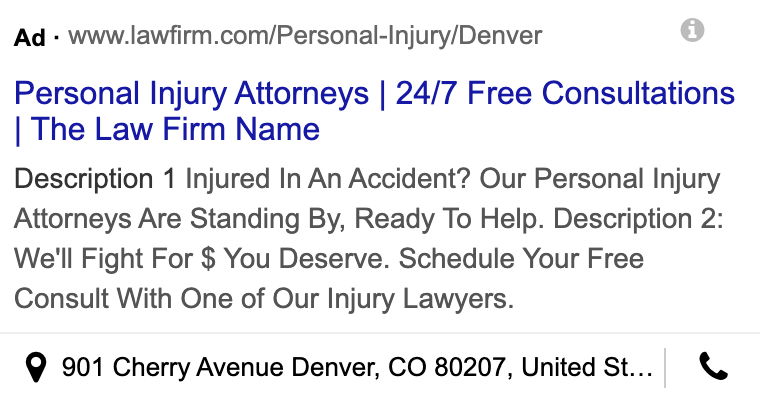
Use a location asset when a real office and its hours help clients choose whether to contact you. Check that the address and service area are accurate. A location asset can display business details, but it does not guarantee a map placement or a better ad rank. Google’s asset guide explains when location and call assets may show.
If a prospective client wants to call, schedule call assets for hours when someone can answer. Check missed calls and follow-up time as carefully as click volume.
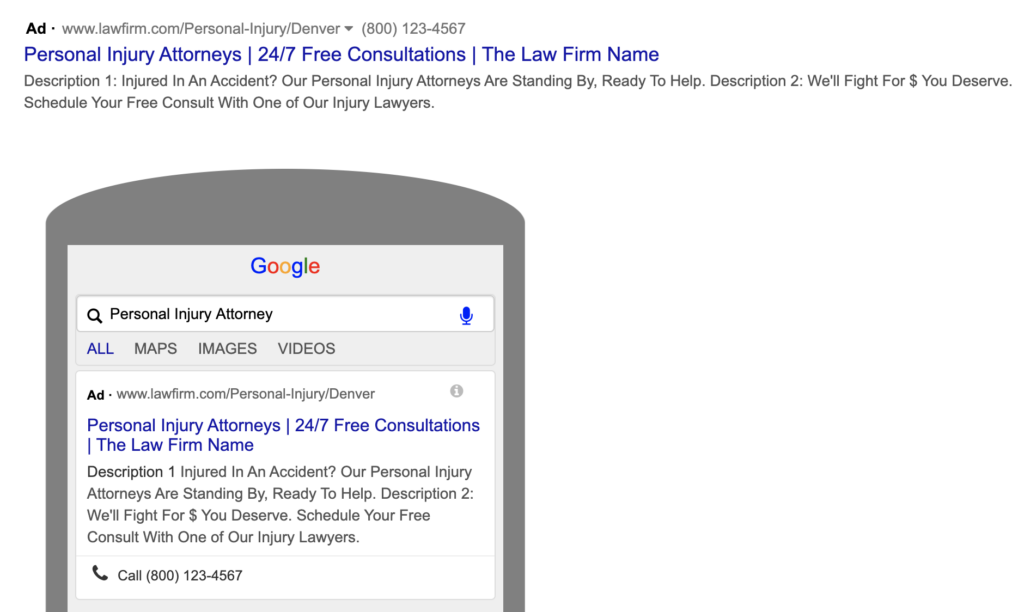
Call assets
These are simple. Add your phone number so users can call your firm right on the search engine results page.
Structured snippet assets
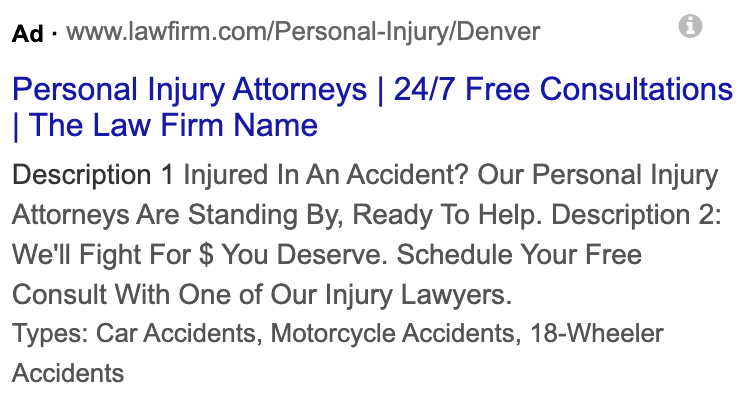
Structured snippet assets are essentially larger callout sections with a brief headline and description. They are an opportunity to mention and explain unique attributes of your firm, like how many clients you’ve served and how long you’ve been in business.
There can be a few, but they are only 25 characters each.
Promotion assets
Promotion assets are 20-character snippets of text that announce a special or promotion. For example, “100% free consultations.”
Lead form assets
Lead form assets can collect an inquiry from the ad. Use them only if someone owns the follow-up, consent and privacy language are approved, and submissions enter the same intake process as website forms. Measure whether these inquiries become qualified consultations, not merely how many forms arrive.
How to find keywords for your Google Ads
If you don’t strategically identify target keywords to rank for, your Google Ads are far less likely to reach potential clients.
There are a few ways to create a keyword list.
Use tools
There are a few tools that you can use to identify keywords for your Google Ads for lawyers.
For Google Ads, the simplest and most affordable tool is Google’s Keyword Planner. If you have an ad campaign, the tool is free.
To start, enter a keyword you would like to rank for in the search bar. The Keyword Planner will suggest lots of keywords (sometimes thousands) to add to your list, along with data about average cost-per-click (CPC) and search volume per month.
If you have room in your marketing budget for paid tools, we highly recommend Ahrefs.com, Spyfu.com, or SEMRush.com. Relying on Google Keyword Planner alone isn’t highly advised; it’s always best to cross-reference data across tools to get a more accurate picture.
Use the search engine results page
If you’re not interested in paying for tools or are looking for more information outside of Google Keyword Planner, the SERP is a great place to start.
When you enter a search term, there are a few features on the SERP that provide keyword ideas to use when you start out.
First, you can analyze your competitors’ ads.
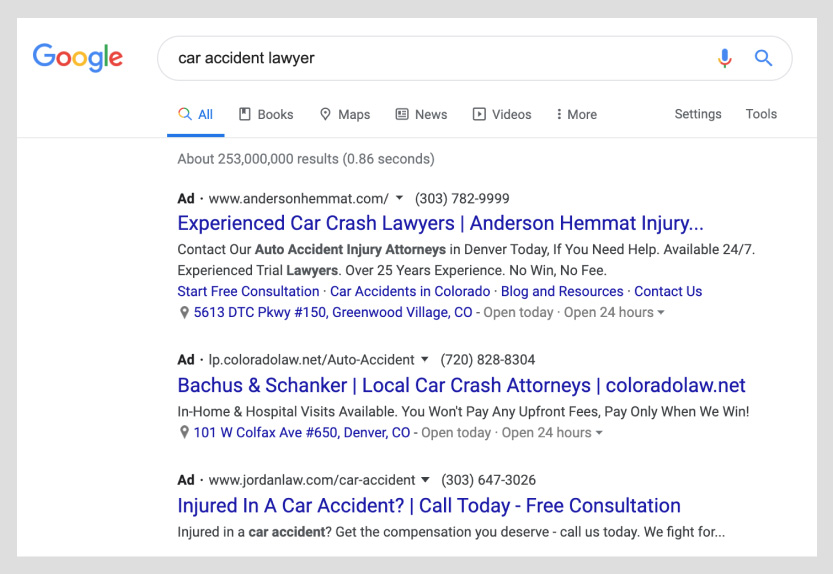
For example, the top-ranking ad uses “injury lawyers” for car accident search terms.
However, be aware that many ad agencies use keyword insertion, one of Google Ads’ dynamic ad features. Advertisers that use keyword insertion allow their ads’ target keywords to be automatically filled using the searcher’s search phrase. So, when you’re doing research, the ads you see may be automatically filled with the search term you used.
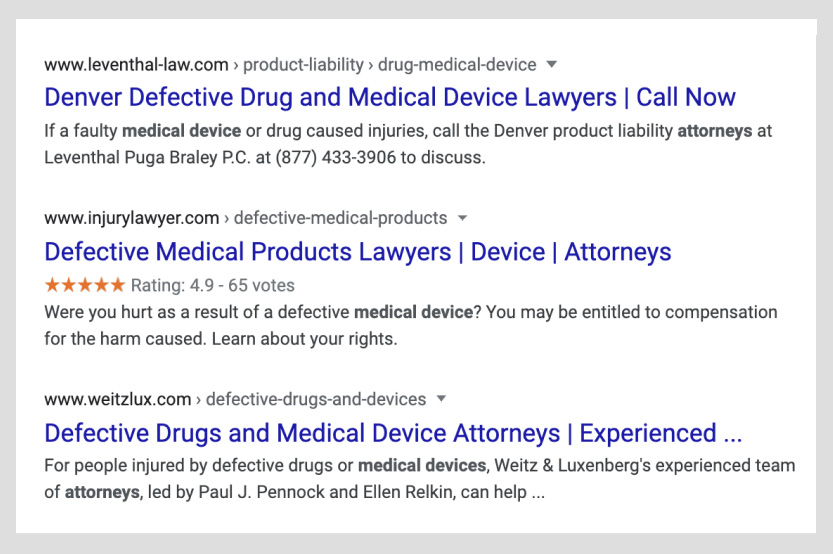
Second, examine the organic results. Typically, you’ll see a variety of synonyms based on your search term.
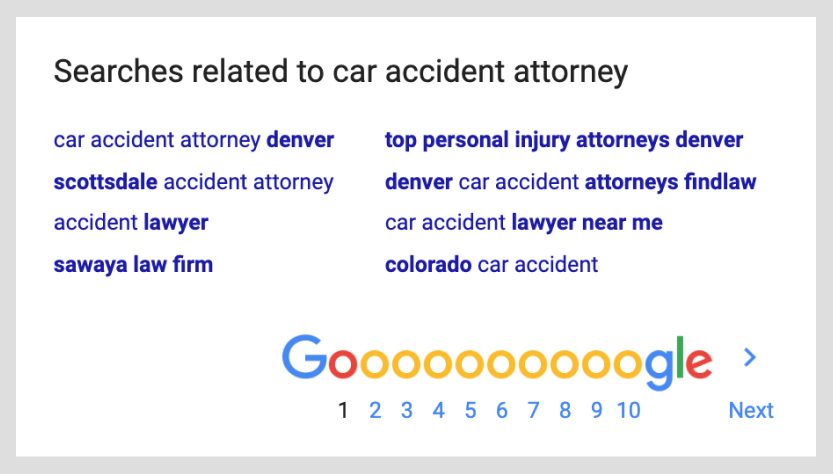
Finally, scroll to the bottom of the page and look at Google’s search suggestions. You’re less likely to find dynamite keywords here, but it’s worth checking.
Pro tip: Include negative keywords
Although underutilized, negative keywords are a game-changer for your legal Google Ads.
Negative keywords are keywords that you do not want to show up for. By adding negative keywords to your keyword list, you can exclude your ads from appearing for certain searches.
For example, a negative keyword for your firm could be “pro bono” or “free.” By excluding your ads from ranking for search terms with these words, you can avoid attracting unqualified leads.
How to minimize your cost-per-click
A cheap click is not a bargain when the inquiry is outside your practice or service area. Compare cost with qualified consultations and signed matters, while keeping staff time in view.
There is no useful universal monthly budget for every law firm. Ask for an estimate for your specific practice, market, and intake capacity. Set a test budget your firm can sustain long enough to review actual inquiry quality; a keyword tool estimate is not your future price per click.
So how do you minimize your CPC?
In both SEO and PPC, Google rewards quality.
Enter Quality Score: Google’s quality assessment of your ad and corresponding landing page. Quality Score is a number between one and 10 that assesses the expected click-through-rate, ad relevance, and landing page experience.
Use Quality Score as a diagnostic, not a target or a measure of signed cases. Google says the displayed score itself is not an input to the ad auction. Inspect its expected click-through rate, ad relevance, and landing page experience alongside actual search terms, cost, qualified inquiries, and retained clients. Google’s Quality Score guidance.
Choose a bidding strategy with your team after checking what the conversion action actually counts. A form submission, a phone call, a qualified consultation, and a signed client are different outcomes. Before optimizing bids toward a lead target, confirm that calls and forms are recorded accurately and that intake can return qualification outcomes. Avoid a universal conversion-count threshold; volume and data quality vary by firm and practice.
How to improve your quality score
There are a few fail-safe tactics you can use to increase your quality score.
Write high-quality ads
Your ads should be the highest quality possible.
- Make sure to follow Google’s stringent editorial rules. These rules dictate everything from punctuation to special characters. You can learn more about Google’s editorial rules here.
- When writing ads, stay focused. Hone in one type of potential client and one practice area.
- Fill out every possible text area and extension. The more content you have, the better.
By following the best practices mentioned earlier, you can optimize your ads for Quality Score AND click-through-rate (the rate of people seeing your ad and clicking it).
Click-through rate varies by query, position, practice, and market. Use it to diagnose whether the ad earns attention from the intended audience, then check which clicks become qualified inquiries. A higher click-through rate can still waste budget if the ad attracts matters the firm cannot take.
Create awesome landing pages
Landing page writing and designing is an art.
There are a few ways to increase the quality of your landing pages. Note that by increasing your landing page for user experience (UX), you will likely increase your Quality Score.
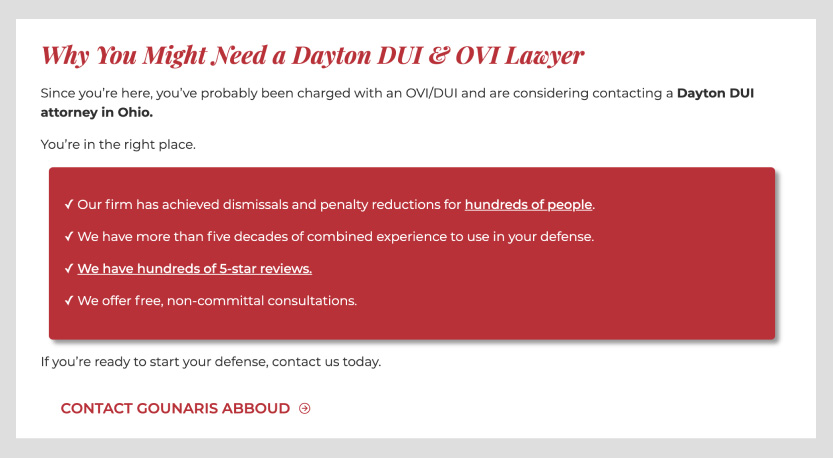
Highlight social proof. Include testimonials and reviews whenever possible.

Present yourself as an authority. Thought leadership is huge, especially in the legal field. Offer articles and case studies.
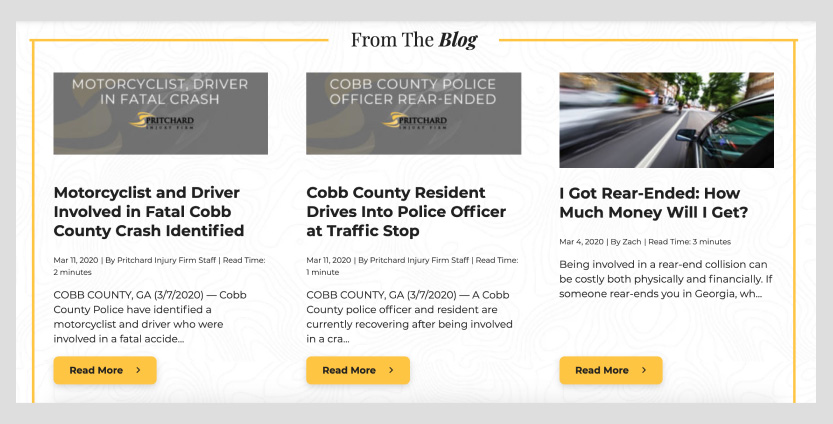
Display results. Avoid bragging, but don’t be shy about displaying your wins. Link to case studies if possible.

Use empathic language. Show potential clients that you truly understand what they’re going through and that you’ve helped many people like them before.

Be specific. Use one idea per landing page. Don’t create one landing page for all your practice areas—your Quality Score and conversion rate will plummet. Keep in mind that the keywords on your landing page should match your ad copy exactly.
Carefully select imagery. Avoid stock photos—especially cheesy car accident and business meeting pictures. Use professional photography of your staff looking friendly and capable.

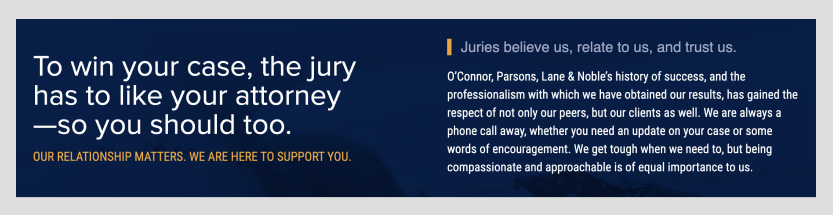
Highlight benefits. In your banner and throughout the landing page, explicitly highlight the benefit of hiring you.

Address your clients’ concerns. When facing legal problems, people have a lot of questions and fears. Boost potential clients’ confidence in you by assuring them.
Match ads and landing pages
Your ads and landing pages should be directly related. If your ad and landing page copy are specific, this should be simple to accomplish.
How to optimize your Google Ads campaigns
Reach more potential clients by using a few advanced optimization tactics.
Before diving into advanced tactics, let’s address the most common mistakes we see law firms make with Google Ads. Many firms send paid traffic to their homepage instead of a dedicated landing page. Others run broad match keywords without negative keyword guardrails, skip relevant ad assets, or launch campaigns without proper conversion tracking. Fixing these basics alone will put you ahead of many competitors from day one. For a wider audit of measurement, query control, landing pages, automation, and intake, use our guide to 10 Google Ads mistakes law firms make.
Tracking
Before hiring a law firm PPC agency, ask how its reports separate calls and forms from qualified consultations and signed matters. Agree on those definitions and who reviews intake outcomes before launching the campaign.
For example, do first-time callers qualify as leads? If your law firm qualifies only first-time callers as leads, then you should set up your campaign to report on that analytic specifically.
If your firm counts only inquiries that fit its practice and service area, intake must record that judgment after the call or form arrives. Label unqualified inquiries and duplicates separately. Call review can help, but a thumbs-up alone does not prove positive return on investment. Reconcile the inquiry with consultation, signed agreement, and collected fees before drawing that conclusion.
Additionally, you have to pick up the phone, answer messages, and follow up on leads. Your agency gets leads to the door—you have to welcome them in. Your support staff should be aware that you are investing in advertising and that answering the phones is crucial to your success—thousands (even millions) of dollars hang in the balance.
Multi-location targeting
If your law firm practices in a few different states or areas, create different campaigns targeting different areas. These can be cities, counties, states, or even zip codes.
This is an excellent tactic, especially if you’re trying to break into new markets.
Geo-fencing
Location settings can help focus spend on areas the firm serves. Review Google Ads location options with your team, check the actual user-location report, and exclude markets where the firm cannot represent clients. Do not assume a small radius identifies a person who needs legal help, and have counsel review sensitive targeting ideas.
Multi-lingual ads
Whether your audience speaks Spanish or German, you should make ads and landing pages in their language. Hiring a translator or having a bilingual individual on-staff is crucial.
Be sure to run separate campaigns for each language and update audience settings based on the audience’s language. This is simple to do, but its importance cannot be overstated.
Additionally, when making ads in another language, complete the ads in their entirety by adding information for all possible extensions.
Finally, your law firm website should be optimized for multiple languages using hreflang tags and language plugins.
Testing
A controlled copy or landing-page test can show whether a change helps, if there are enough comparable inquiries to interpret the result. Record the version, dates, targeting, spend, and qualified outcomes before changing another element.
You can A/B test a few different aspects of your campaign.
- Keywords
- Ads
- Landing pages
When you conduct testing, take special care in tracking what exactly you’re testing.
For example, you could test keyword placement, CTA language, and landing page design.
Another tactic worth considering is ad scheduling, sometimes called dayparting. This lets you control when your ads run during the day and week. For most law firms, the highest-value calls come during business hours when your intake staff can actually answer the phone. You can set your campaigns to run only from 7 a.m. to 7 p.m. on weekdays, or increase your bids during peak inquiry hours and lower them overnight. This keeps you from burning budget on clicks that go to voicemail.
How to ensure your ads are bar-compliant
As an attorney, you understand the gravity of bar-compliance.
Have the responsible lawyer review the complete ad, assets, landing page, and intake promises under the rules that govern the firm before launch. Preserve approved copy so later tests do not reintroduce unreviewed claims.
Check your local advertising regulations
Before running ads, head to your local bar’s website to check advertising regulations.
Rules differ by jurisdiction and ad format. For example, The Florida Bar explains which advertisements require filing and when; its timely filing deadline is at least 20 days before first use. Check exemptions and current fees before assuming a particular Search ad must be filed.
Identify Google’s legal ad rules
Google Ads has its own editorial and advertising policies. Those platform policies and the rules of the jurisdictions that govern your firm are separate reviews.
Similar to web content, attorneys cannot do the following:
- Promise success for your clients.
- Imply specializations without proof of certification.
- Mention personal attributes.
- Include false, deceptive, or unproven claims.
Have counsel check legal advertising claims and Google Ads policy independently. Approval by the platform does not establish compliance with professional-conduct rules.
Get more clients with Google Ads for lawyers
Although we don’t invest our clients’ entire marketing budgets in paid advertising, PPC services for lawyers can be a highly beneficial channel in your marketing mix.
If your firm wants a second set of eyes on its ad copy, landing page, and intake path, book a discovery call. Bring one practice area, target market, sample ad, and recent inquiry report so the discussion can focus on the cases you want and the capacity to handle them.
Before the next ad goes live, ask: Can a prospective client tell what we handle, where we work, and what happens after they contact us? Can our intake team tell us which inquiries became suitable matters? Those answers should guide the next copy test.
