Embracing new ways to enhance client engagement is a must these days.
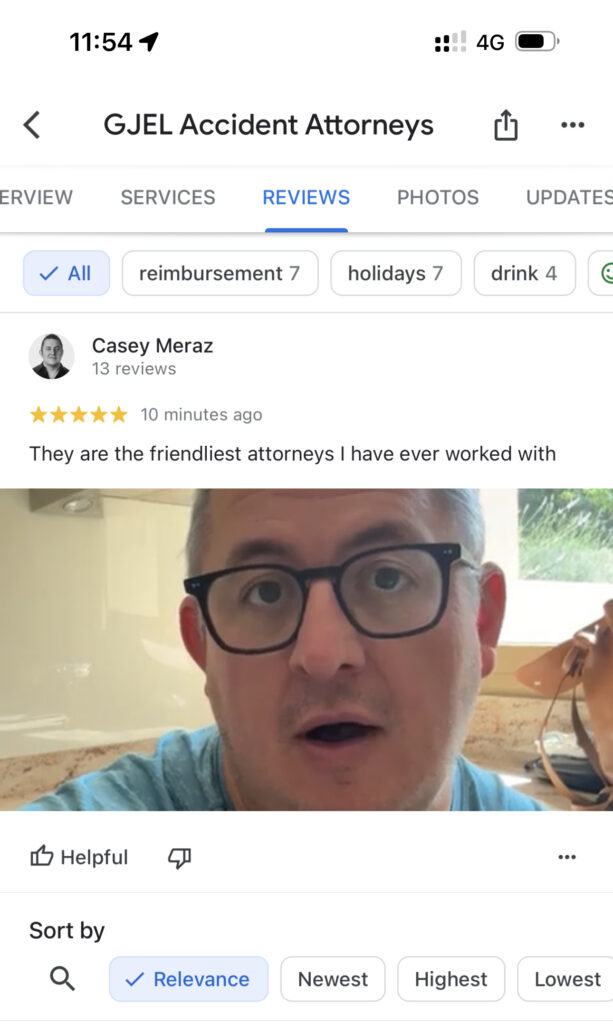
One way, now more than ever, is the Google Business Profile, specifically video reviews.
Are you harnessing the potential of this rich, dynamic medium for your firm?
Video reviews can provide an authentic, vivid snapshot of your clients’ experiences, taking your online reputation to new heights. And we already know that over 85% people turn online to look for reviews before hiring an attorney. But the question remains, are you actively seeking these video testimonials on your Google Business Profile?
Integrating this innovative approach into your review gathering process could revolutionize your digital visibility and client trust. Don’t just stop at text and images— let’s explore how video could be the game changer in amplifying your firm’s online impact.
How To Get Video Reviews on Your Google Business Profile
- Have your clients create a video using their smartphone.
[Pro Tip: Ask them while they’re at your office and make sure they do it!] Ensure the video doesn’t exceed 30 seconds in duration
Keep in mind that Google has a few technical requirements for the video itself. Google requires videos to be at least 720p resolution and under 75MB in file size. Most smartphone videos recorded in standard “HD” mode will clear both thresholds without any editing. If a client’s phone is older and records in lower quality by default, encourage them to check their camera settings before filming. - They will need to open the Google Maps application on their mobile device (this is where video reviews can be posted). If they haven’t installed it yet, they will need to download and install it.
[Pro Tip: Get a sign or business card with your QR Code that links directly to this page to open the URL easily for them].
To generate your review QR code, log in to your Google Business Profile at business.google.com, navigate to your profile, and look for the “Get more reviews” option. Google will generate a direct review link you can plug into any QR code generator. We use QR Code Generator (qr-code-generator.com) for this. One important note: video reviews can only be posted through the Google Maps mobile app. Clients reviewing from a desktop browser won’t see the video upload option, so the QR code that opens the app directly is especially useful here. - Once they open up their Google Maps App, guide them to the ‘Reviews Tab’.
- Next have them enter a star rating (5 is best!)
- Next, fill out the comments section. Since they’re leaving a video review this can be shorter than normal.
- They will see an ‘Add Photos and Videos’ option – here is where they will need to select the previously recorded video. This will upload the video and post it to the review once they click done and post.
One thing worth knowing: asking clients directly for reviews is explicitly allowed under Google’s review policies. What you can’t do is offer incentives in exchange for reviews, including gift cards, discounts, or anything of value. Keep the ask clean and honest (“We’d really appreciate a review if you’re willing”) and you’re well within Google’s guidelines.
Video testimonials not only offer a dynamic way to highlight your law firm’s credibility and client satisfaction, but also boost your visibility in local legal search results.
How Google Might Utilize This In The Future
As we look towards the future, it’s plausible that Google may leverage the power of video reviews in generative AI search results. For instance, Google might develop algorithms that are capable of extracting and analyzing the content and sentiment within these videos, essentially “reading” them. This analysis could then be used to generate more nuanced, engaging, and informative search results.
Imagine searching for a law firm and instead of just seeing star ratings and text, you are presented with short, compelling video testimonials directly in the search results.
This could dramatically enhance user experience, offering a more personalized and relatable touchpoint that traditional text reviews often miss. Furthermore, the preference for video content is increasing, especially among younger audiences (and we know they already like TikTok), so such an innovation could be a key differentiator for Google in the evolving search engine landscape.
On the flip side: what happens if a client leaves a video review that’s inaccurate, defamatory, or violates Google’s content policies? You can flag any review, whether text or video, for removal directly from your Google Business Profile dashboard. Google will evaluate whether it violates their policies. What you can’t do is flag a review simply because it’s negative. If the review is genuine and the client had a bad experience, the right move is to respond professionally rather than try to remove it.
As always if you have multiple offices make sure to strive to get reviews for each office location.
If your firm is looking to enhance their search results and sign MORE of your BETTER cases, contact our law firm marketing consultants today for a free firm strategic review.